Collaborating with engineers to ensure web accessibility.
Project Context
Overview
Elevate by Principal was originally built by contractors on Salesforce Experience Cloud. Between the time that I came on board in 2023 and now in 2025 we brought our engineering team in-house, tried to integrate the Principal Design System (PDS) components into Salesforce, and Principal announced their Digital Accessibility Policy which enforced a conformance of the Web Content Accessibility Guidelines (WCAG) 2.2 A and AA success criteria.
Key Stakeholders
Product leadership and engineering leadership.
Tools Used
Figma, Chrome Dev Tools, Siteimprove Accessibility Checker, NSK Accessibility Checker, Cypress Accessibility Checker, Apple VoiceOver, and NVDA Screen Reader.
Project Goals
-
Equitable Experiences For all visitors of our website
-
WCAG 2.2 AA Standards


Timeline
Q4 2024 - Present
Team



 Accessibility
 Best Practices
 Accessibility
 Best Practices
Problem Statement
How might we ensure all users have an equitable experience across our website and web app?
Audit
Principal's Digital Accessibility Policy took effect in May of 2025 and it was announced in June or July of 2024, so we had about a year to prepare. The policy stated that any new development starting in May would have to meet A and AA WCAG 2.2 standards. However, until the policy took effect, web accessibility was never prioritized. Hoping to make it easier to meet accessibility requirements, the engineers figured out a way to import PDS components which had built-in accessibility considerations. While automated testing with tools like Lighthouse in Chrome DevTools gave us scores for accessibility in the 80s and web best practices scores in the 40s and 50s, manual testing using a keyboard with VoiceOver uncovered a host of problems.
Key Findings
-

The majority of the web app was inoperable by keyboard navigation.
-

There was hardly any semantic HTML elements used, just about everything was a div.
-

The PDS components were wrapped in Salesforce components, making it difficult to add ARIA props.
Enter Figma's Annotation Tool
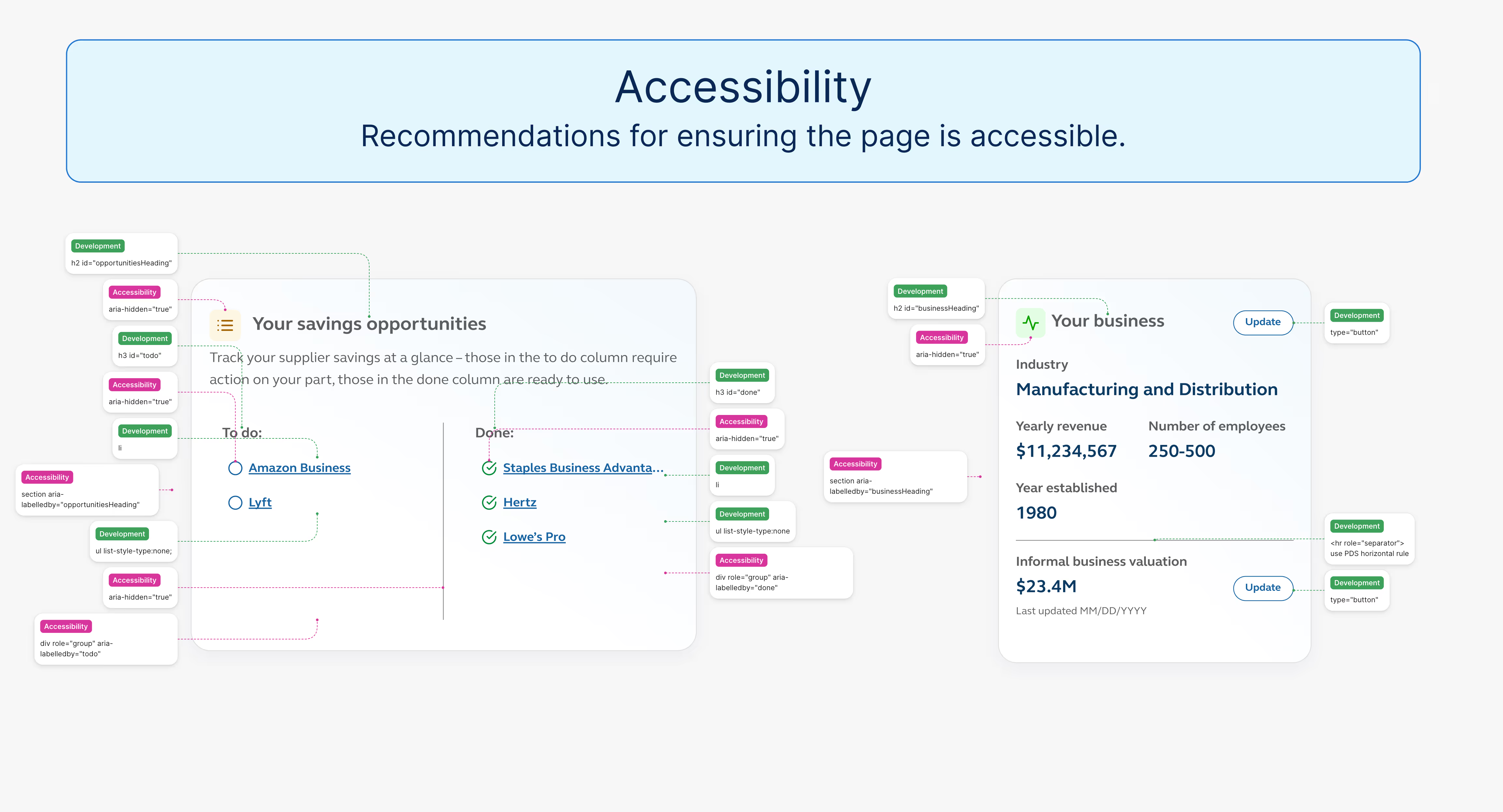
In April of 2025, just before the new policy went into effect, we were adding a new feature into our web app. Knowing the implementation would take us until the end of April and beginning of May before release, I knew we would have to address any accessibility concerns. This is when Figma introduced their annotation tool, which I took advantage of to help make recommendations to make the pages more accessible.
It turned out to be a very helpful tool to communicate suggestions and expectations with the engineers.
The Process
Predicting Opportunities
I surveyed our front-end engineers and none of them had experience with building accessible experiences. I knew I had my work cut out for me, but I wanted to be as helpful as I could so I took it upon myself to learn as much as I could about web best practices and implementing accessibility techniques. I began annotating everything in Figma, knowing the penchant for using divs for everything.
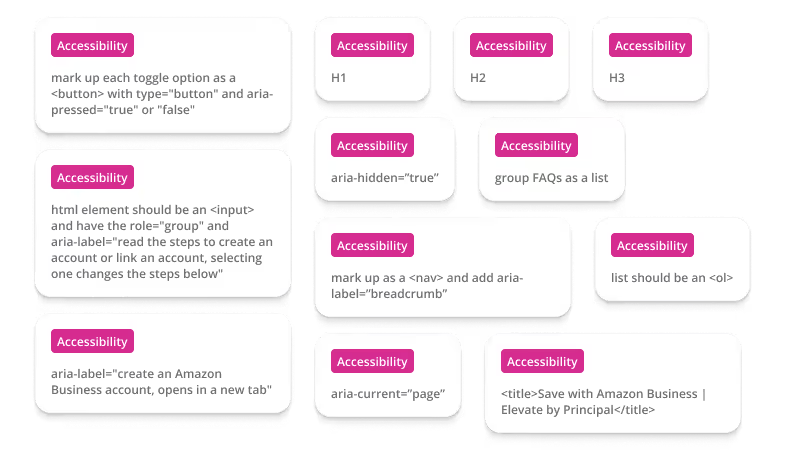
In my Figma file, I annotated:
- Heading levels.
- Ordered lists, unordered lists, and list items.
- WAI-ARIA properties.
- Alt text for images.
- Descriptive page titles.
While I've had some past experience with accessibility, testing keyboard navigation, and screen reader experience, I have always relied on engineers to know how to make it work. This was a real learning experience for me diving deep into front-end HTML and making a page functionally accessible.
I spent a ton of time researching best practices, keyboard functionality, ARIA roles and properties, and how to meet success criteria for A and AA conformance levels. I annotated my way through the Figma designs based on my understanding of my research, but I couldn't say with high confidence that my suggestions would help without testing them, so I made sure to always refer to my suggestions as "recommendations" and never "requirements."
Collaboration With Engineers
During the handoff of the design files, I showed the engineers the new annotation tool and how to read the recommendations. I encouraged them to do their own research, I linked to documentation, articles, and tutorials I used to make the suggestions, and told them to challenge me if they found better ways to make things accessible.
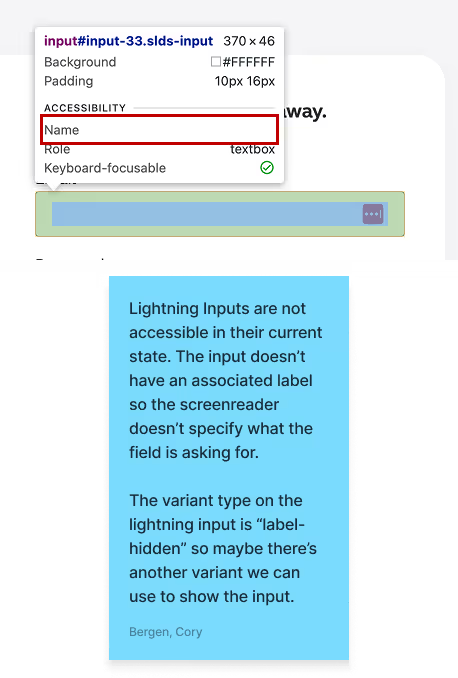
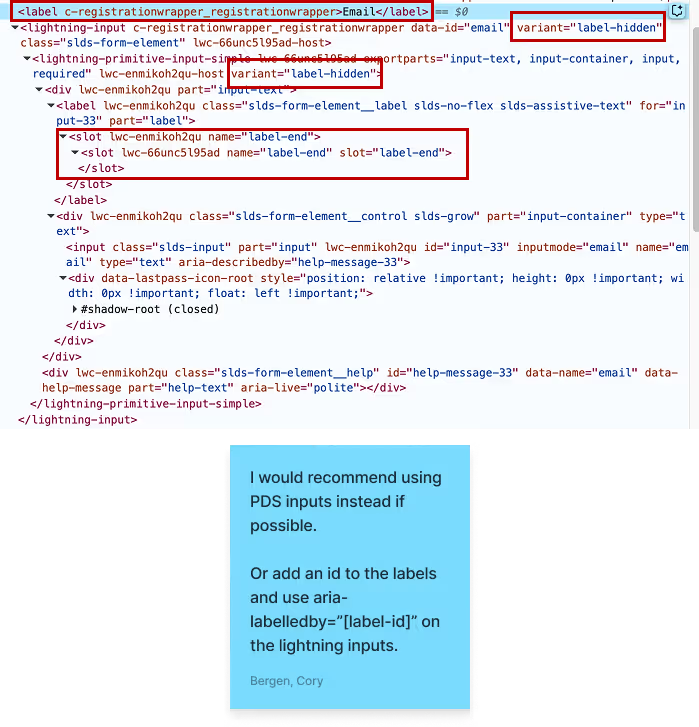
During the development process, I was in constant contact with the engineers, answering questions in chat, hopping on calls, and providing recommendations if they ran into hurdles or if I learned something new. For example, when one of our new pages required a form with an input field, I uncovered the fact that the inputs we had been using throughout the site were not accessible, they didn't have an accessible name. I gave my analysis on the problem and suggestions on how to fix the issue.
Validating The Accessibility
Testing in Lower Environments
As the engineers were working on these improvements, they would publish their changes to a testing environment where I could validate them.
When testing for accessibility, I would ensure:
- The end-to-end flow for the feature was navigable by keyboard.
- Navigating the page with a screen reader, I used Apple VoiceOver, made sense and followed the logical flow of the page.
- Using automated testing tools like SiteImprove and Lighthouse in Chrome DevTools didn't uncover any major issues.
If I found issues during my testing, I would communicate them with the engineer and we made the call if they were blocking issues or if the fix could wait.
Progress Over Perfection
Since the team and I were new to developing an accessible product, there was a lot of back-and-forth communication to get the new feature in a good state. Testing the new pages in lower environments uncovered a dozen changes that required attention, but only a couple really impacted the user experience for screen reader users.
However, this journey to accessibility was not going to happen overnight, so we made the call to ship the feature to production while I created tasks in Jira to track the fixes needed. These were quickly addressed in the next release.
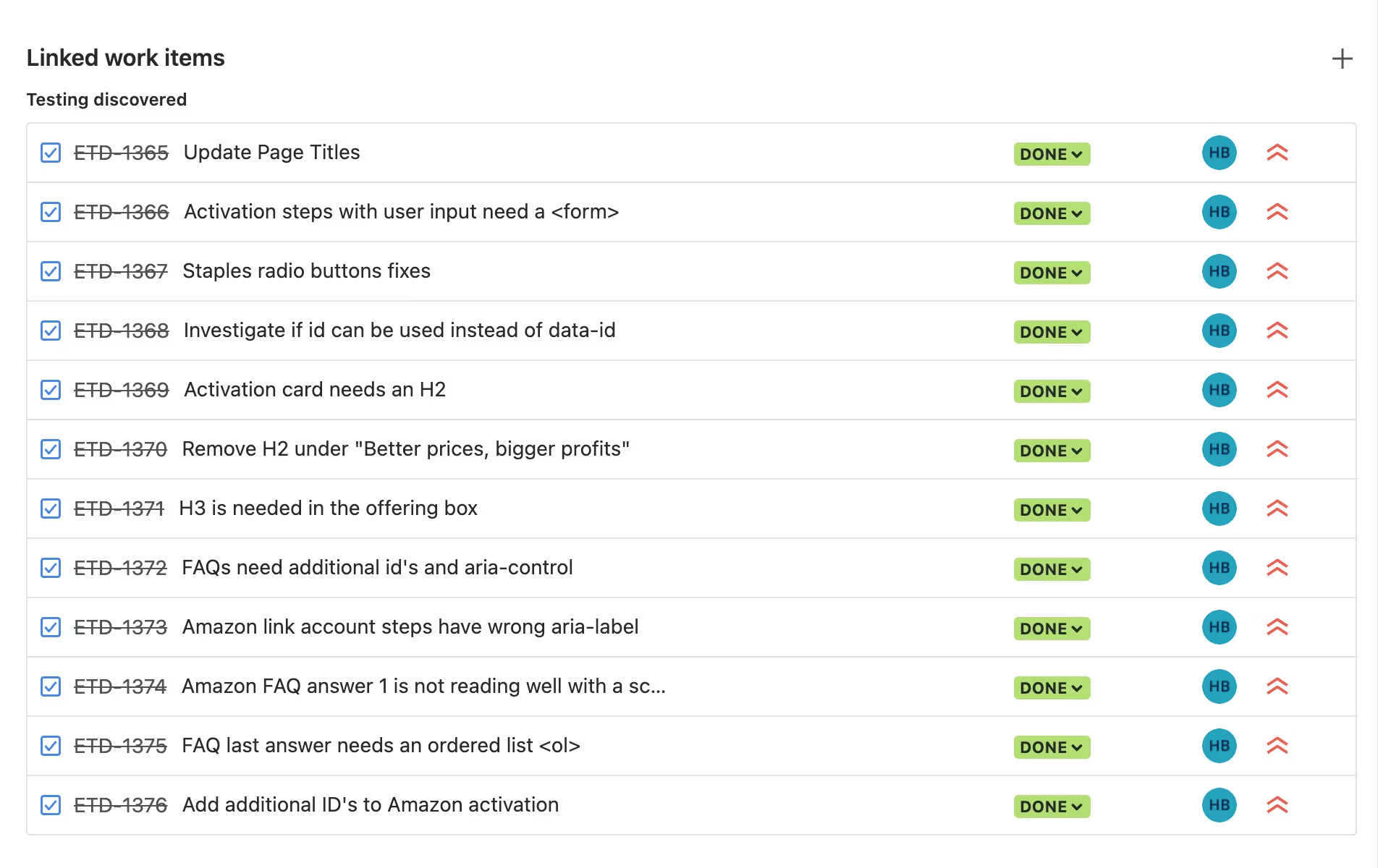
When I could, I provided as much information as I could to explain what the issue was and what a potential fix could be, including some example code.
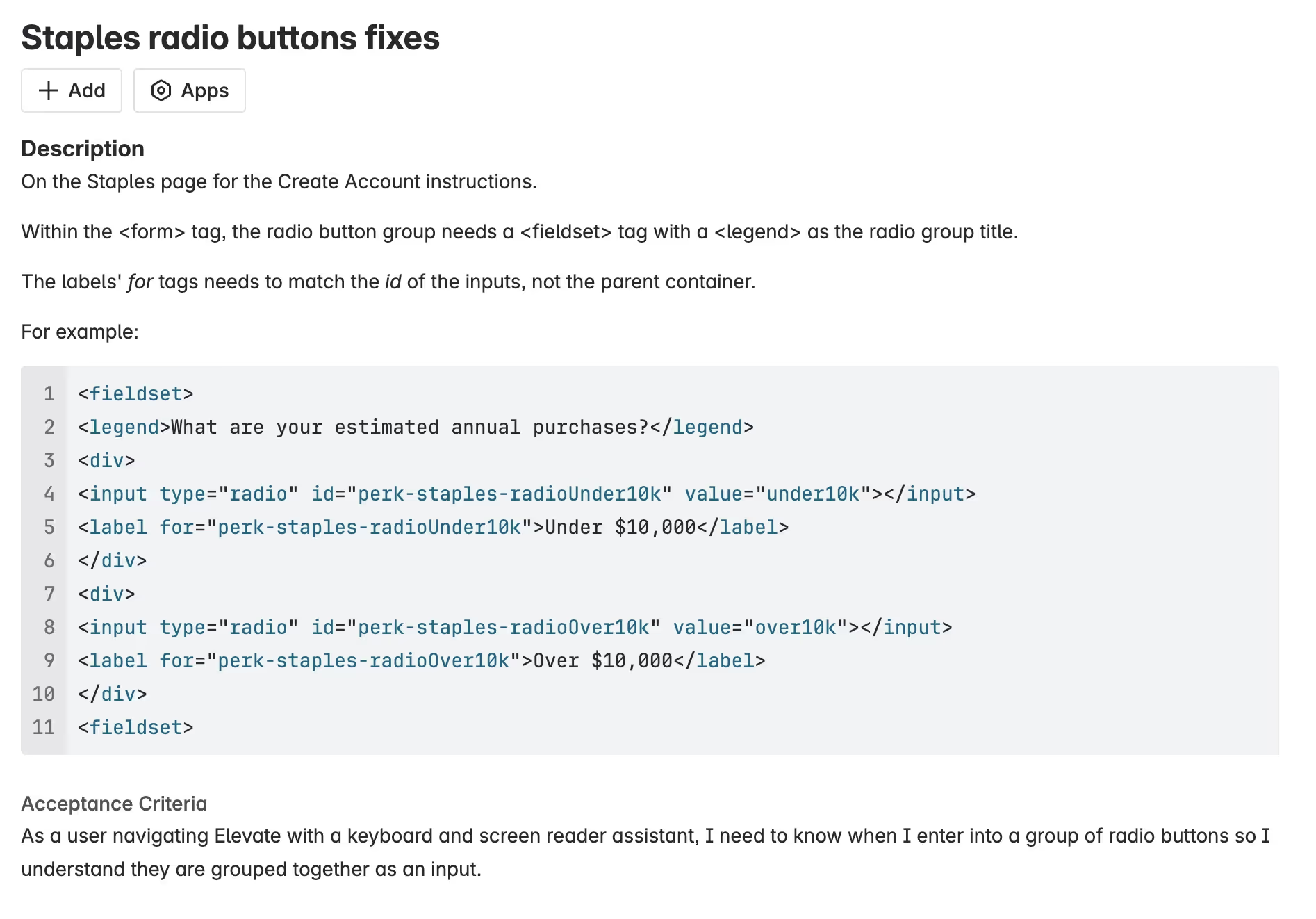
The biggest issue we faced was the tech stack that Elevate was built on and our implementation of the PDS components. Because the PDS components weren't built for Salesforce Experience Cloud, our engineers had to work their magic to import them into Salesforce for us to use. This resulted in each individual PDS component being wrapped within a Salesforce component, which gave us a lot of heartache. It made it extremely difficult for the engineers to make simple changes like the example code above.
There was good news just around the corner, however. The engineers had been exploring options for migrating to a new tech stack and rebuilding the product outside of Salesforce.
Migrating Tech Stacks
There was an enterprise-level initiative at our parent company to develop web applications using a Next.js meta-framework, Next Software Kit (NSK), that our engineers adopted. This gave us the opportunity to directly adopt and inject PDS components, giving us a deeper level of control and making accessibility changes so much easier.
Result: Allows us to directly inject PDS components to leverage the built-in accessibility considerations. It also gives us a lot more control over the rest of the elements on the page and the ability to add any attributes, roles, and properties needed to make the page more accessible.
Measuring Our Results
Months after the migration to NSK began
The new direction of rebuilding in NSK is almost complete. We've rebuilt most of the key features and any new work is built in NSK. This gives us:
- An accessible experience in our product.
- The ability to leverage PDS components and their built-in accessibility.
- More lightweight code with improved load speed.
- Passing scores in testing tools like Lighthouse and Siteimprove.
Accessibility is now a part of our product development process from the start of initial designs.
I'm now involved in testing while new feature work is released in lower environments where I can test for things like navigation and screen reader experience from the start.
 Accessibility
 Best Practices
Lessons Learned
Key lessons from working with developers to make our app more accessible:
- A good foundation is key, migrating our tech stack from Salesforce Experience Cloud to NSK has made the world of difference.
- Creating an accessible web experience can get complicated, but knowing the technical side will help inform my future designs.
I feel much more confident now in my understanding of what it takes to meet WCAG A and AA conformance level, but I'm still learning more every day.
Next Steps
As we continue to adhere to Principal's Digital Accessibility Policy, we will:
- Continue migrating our product from Salesforce to NSK.
- Designing and developing our experience with accessibility in mind.
- Leverage our connection with Principal's User Experience team to find and recruit disabled users to test with.
- Continue learning more about web accessibility and I aim to earn my IAAP certification.
With these plans, we strive to deliver an equitable experience for all of our users.
Thanks for reading!
I hope you enjoyed this case study. Feel free to check out the next one or go back to all of my projects.